
什麼是變焦?
Zoom是一個視頻會議平台,可用於與使用音頻和視頻通話的人建立聯繫。 它使用戶可以與同事,朋友和家人互動。
縮放功能需要通過蜂窩或Wi-Fi連接來組織電話,並且幾乎可以在地球上的任何地方進行訪問! 由於COVID-19大流行,Zoom最近在全球範圍內受到歡迎,因為許多人被迫在家中工作,並遠離親人。
與FaceTime不同,Zoom幾乎可以在任何平台上使用,無論是iPhone,Android,Windows還是Mac。
Zoom可以安裝並下載到任何設備上,從而使用戶可以虛擬地組織會議以進行工作和家庭聚會。 這意味著沒有家庭成員會因為他們擁有的設備而被排除在對話之外。
如何設置老年人變焦
建議為老人設置計算機上的Zoom。 這是因為手機比電腦小巧,安靜。 雖然可以在所有設備上下載Zoom,但其功能在平板電腦上有所限制,某些功能的可訪問性不如在計算機上。
在計算機上安裝Zoom
需要有效的互聯網服務才能設置Zoom。 您將需要根據所使用的設備下載正確版本的Zoom。 重要的是要確保為Mac或Windows選擇正確的版本,以使Zoom能夠正確安裝。
- 確保已關閉計算機上可以訪問照相機的所有程序。
- 單擊通過電子郵件發送給他們的“縮放”鏈接,“縮放”應自動快速地下載到計算機上
- 或者,您可以要求他們進入Zoom網站- 縮放.us 並單擊“加入會議”按鈕,這將提示他們在使用前將Zoom安裝到他們的計算機上。
- 在計算機上的“下載”文件夾中,單擊“ Zoom_launcher.exe”。 縮放應使用橙色大標記自動指出
- 啟動Zoom後,將彈出一個屏幕,詢問其名稱。 這樣可以在視頻通話中識別他們。
在手機/平板電腦上安裝Zoom
- 使用App Store或Google Play商店,或訪問網絡上的Zoom,將Zoom應用安裝到父母的設備上– 縮放.us
- 另外,您可以要求他們進入Zoom網站並單擊“加入會議”按鈕,這將提示他們在使用手機之前將Zoom安裝到他們的手機或平板電腦上
- 下載Zoom應用程序後,他們可以輸入會議ID並登錄
- 加入通話之前,系統將提示他們輸入姓名
- 要結束視頻通話,只需點擊紅色 離開會議 按鍵
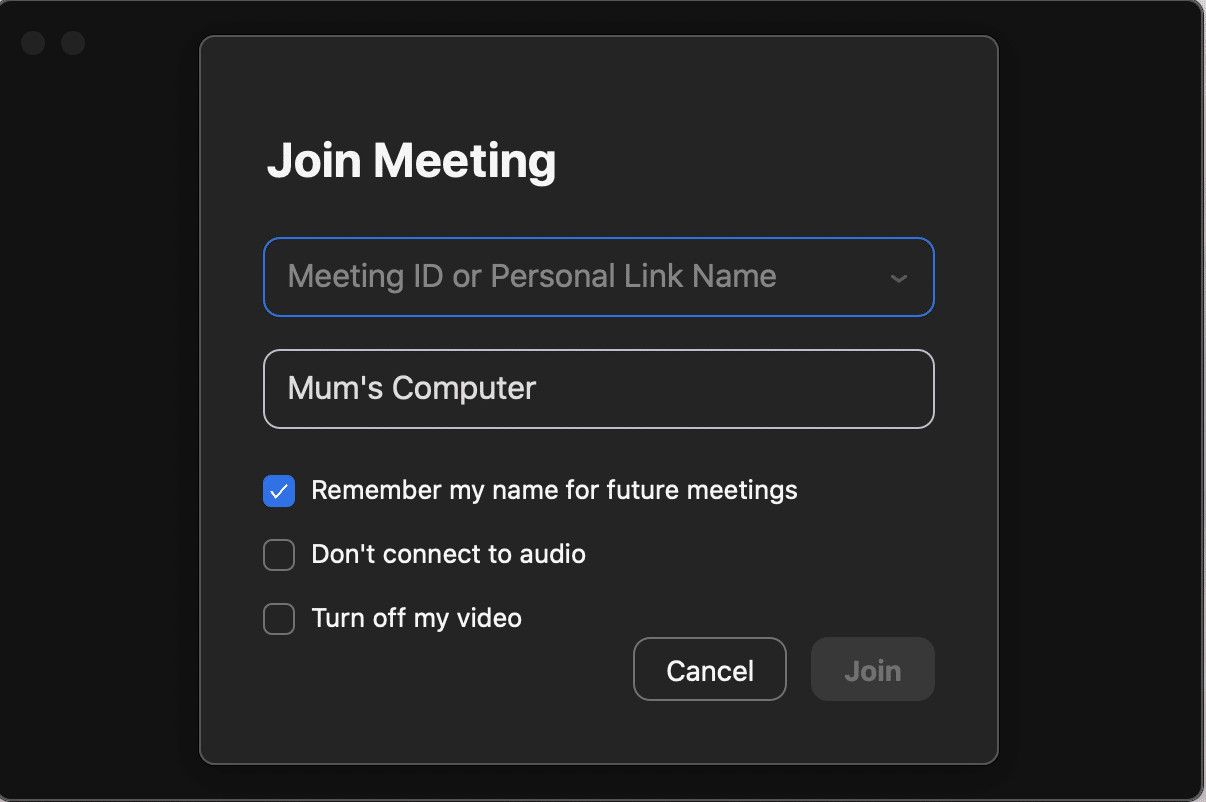
縮放要求用戶輸入唯一的會議ID,以便組織語音和視頻通話。
用戶也可以在通話過程中輸入名稱以識別他們。 能夠選擇保持其視頻關閉且僅使用麥克風的選項。
讓老年人更輕鬆地享受Zoom體驗
- 從屏幕上刪除所有其他圖標,只需將應用程序單獨放在屏幕上
- 關閉自動更新以防止彈出式提醒或您的父母可能不熟悉的任何事情
- 使用長電纜將設備永久固定在充電器上
- 購買保護套以防止屏幕掉落時破裂。
- 購買合適的耳機以最小化背景反饋。
- 確保在他們使用設備的房屋的每個角落,Wi-Fi信號強度都很高。
- 將音量設置為所需水平。
- 輸入所有相關詳細信息,例如名稱,然後預先選擇。 安裝Zoom時進行視頻通話選項。
- 您需要提前打電話給他們,以確保他們具有會議鏈接並能夠加入會議。

Zoom主要用於為在家工作的人員模擬工作環境。 因此,對於一個非常大的成年人來說,縮放界面可能很難使用,因此,如果您的父母不懂技術或存在移動性問題,他們可能會難以使用縮放。
替代縮放
Zoom 的流行得益於居家辦公人數的增加。然而,它的主要用途仍然是讓同事保持聯繫,並像在辦公室一樣組織「會議」。組織者可以主持會議,並將連結發送給與會者,以便他們加入會議。但是,如果沒有鏈接,就無法加入通話。
最近,由於外部人員僅通過獲取鏈接即可加入機密會議,因此也存在隱私問題。 這可能與您的父母或所愛的人使用他人共享的設備有關。 用戶還需要單擊許多鏈接並遵循步驟才能加入呼叫。
結合上述問題,非常老的成年人很難使用該界面,因此,如果您的父母不精通技術,他們可能會難以使用Zoom。
幸運的是,除了 Zoom 之外,還有其他一些更容易使用且更可靠的替代方案。例如 Teams、FaceTime、Facebook Messenger 和 Viber 等應用程式都是不錯的選擇。
Konnekt 我們審查、評估並分析了20多個全球領先的視訊通話平台。然後,我們將其中最優秀的功能整合到我們自己的硬體中,並開發了比所有其他替代方案都更便捷、更易於使用的應用程式。
為什麼 Konnekt 使用其自身的硬體和應用程式
安卓平板電腦和iPad價格低廉(通常低於1,000美元),並提供數千款應用程式。然而,如果您不習慣使用科技產品、想要一款易於使用的設備,或者由於聽力、靈活性或視力等原因有特殊需求,這種靈活性反而會成為您的劣勢。
我們的 Konnekt 硬件:
- 配備15吋螢幕,按鍵大,字體高。視訊通話清晰逼真,按鍵易於操作。
- 我們停用了側面的電源和音量控制,以防止使用者意外地將裝置靜音或關閉。
- 它沒有應用程序,只有一個一鍵式使用者介面。使用起來極為簡單。
- 沒有令人困惑的圖示、捏合縮放、選單、滑動或雙擊操作。
- 無需登入或密碼,無需鍵盤或滑鼠,也沒有彈出視窗。
- 軟體更新會在夜間靜默進行,無需使用者互動。
- 一切運作穩定。更新不會改變介面外觀、您的設定或使用方式。
- 我們注重可靠性和易用性,而不是添加表情符號或花哨的聲音。
- 拿起平板電腦時,很容易不小心碰到螢幕上的按鈕。我們解決了這些問題!
- 我們徹底解決了詐騙電話和電話推銷的問題。
Konnekt 可視電話 –世界上最方便的老年人視頻通話
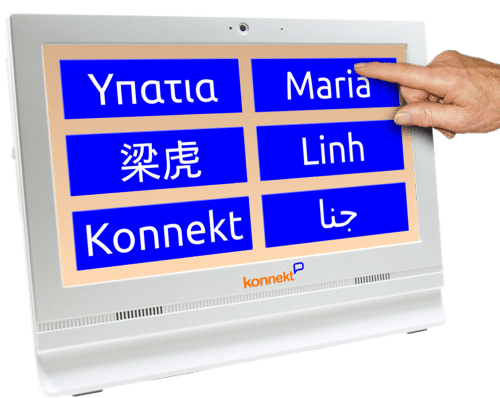
Konnekt 可視電話具有令人難以置信的服務: 個人化定制服務. 設置與管理 底層視訊通話服務。 聯繫我們 邀請。 交付。 最好的, IT技術支持當用戶的網路或家庭成員的智慧型手機出現問題時,我們隨時準備提供協助。
需要更多按鈕嗎? 增加音量? Konnekt 它會遠端為您完成所有操作。或者,您也可以使用我們便捷的智慧型手機應用程式或網頁門戶,邀請和移除聯絡人,並對視訊電話進行自訂設定——所有操作均無需拜訪視訊電話用戶或訪問視訊電話本身。
Konnekt 即使親朋好友從未在智慧型手機上安裝過應用程序,我們也能幫助他們輕鬆使用視訊通話應用程式。想像一下:您的全家人都能在智慧型手機和平板電腦/iPad 上愉快地使用視訊通話功能,進行一對一通話和家庭群組通話,而您無需費心說服或指導他們!
Konnekt 可視電話
Konnekt 讓視訊通話變得簡單。 Konnekt 視訊電話可以用來與世界上幾乎任何人通話,但它的介面最簡單,可以一鍵撥打電話和一鍵(或自動)接聽電話。 Konnekt 榮獲「最佳消費者友善產品獎」。
您的父母將能夠輕鬆地與家人和朋友溝通,而不會遇到任何麻煩。 它比傳統的手機,平板電腦或計算機更易於使用-無需任何技能!
我們簡潔易用的介面讓老年人輕鬆撥打和接聽視訊通話。它也可以像普通座機一樣使用,但比傳統電話方便得多。
使用可視電話,您將永遠不會看到任何彈出窗口或更新請求,並且默認情況下,用戶將不會收到來自非授權聯繫人的任何人的呼叫。
- HIDDEN 視訊通話的複雜性被隱藏了起來,使其變得超級簡單。
- LOUD,比傳統的平板電腦或手機揚聲器響亮
- 巨大 一鍵式 不需要眼鏡
- UNLIMITED 撥打電話–毫不奇怪
- 自動 從選定的受信任聯繫人進行應答
- 拆包 –無需技術設置,只需將其插入電源即可。 就這樣
- 大型 屏幕,比平板電腦大得多
- 管理 –帳戶訂閱和軟件是遠程管理的
該票據 Konnekt 不代表蘋果、Zoom 或微軟。