
Alternative to a CapTel phone or a Teletypewriter (TTY) for those with deafness or impaired hearing
The Konnekt Captioning Videophone is an incredibly easy-to-use captioning phone. It captions both standard phone calls as well as video calls, enabling you to read lips and facial expressions.
Speech-to-text phone calls have never been easier.
Click to read about the Konnekt Captioning Videophone.
Alternative to the National Relay Service (NRS Australia)
The Konnekt Captioning Videophone is an excellent alternative to the National Relay Service (NRS Australia) for individuals with hearing challenges or deafness who seek a more direct and timely experience.
Why is Konnekt a good alternative?
- Direct Private Calls: No operators are involved. Callers can reach you directly and privately, just like a regular phone.
- Immediate Connection: No waiting for an operator to join the call—perfect for emergencies or urgent conversations.
- Automatic Answering: The phone can auto-answer calls from trusted contacts, ensuring you never miss important communication.
- Ease of Use: The device is incredibly simple to use, making it ideal for seniors or those who prefer straightforward technology.
- Good for Emergencies: Immediate access without delays or third-party intervention.
Captioning phone alternatives
From 1 February 2020, Captel phones were no longer connected to the National Relay Service — read why in the Statement to the House. Many rely on captioning phones to communicate with the outside world including their doctors, pharmacists, family, friends, colleagues, customers and care-givers. There is a need to migrate to alternatives, such as the Konnekt phone.
How CapTel captioning used to work
The CapTel® captioning phone worked in a similar way to a regular phone but added live captioning, sometimes known as transcription, subtitles, or voice-to-text.
To call a friend from your phone, you would first press a Captions button to enable captioning, then dial your friend’s number. The phone would connect you to your friend so that you could talk, just like using a traditional phone.
The phone would also connect you to the domestic captioning service, via the Internet. The captioning service would transcribe your friend’s voice into text, using a human relay officer, sometimes called a relay agent. The officer would re-read what he thought he heard into a computer (adding a delay) and then, using his keyboard, the officer would attempt to correct anything that was mis-heard or mis-captioned (adding another delay). The text was sent to your phone via your Internet connection, and appeared on a small screen built into the phone. This enabled you to read what the other person was saying.
The captioning service is run by the National Relay Service (NRS). NRS is a government initiative that offers a wide variety of services to help people who have hearing and/or speech impairments to make and receive calls.
In Feb 2020, the phones in Australia were temporarily connected to a US captioning centre, providing additional time for users to transition to alternatives. The temporary voice connection across the globe, plus the return trip for the captions, would add another 0.5-1.0 seconds to the captioning latency, slowing down what you see on the screen.
Strengths
- Direct dial: You dialed the phone number of the person you wanted to call, and vice-versa. There was no need for you or your callers to call the relay officer (as is the case with some other systems such as the Teletypewriter, also known as TTY).
- Accuracy: Captions were delayed but were usually quite accurate, due to the use of a trained Australian human relay officer, as long as the speech was not too fast.
- Emergency service: The user could pick up the handset, press the Captions button if required, and dial 000. Some TTY systems require a separate phone number and/or a 9-step procedure.
Shortcomings
- Lack of privacy: A relay officer would listen in to your phone calls.
- No video: The Captel phone does not allow video calling, so there was no ability to lip-read, perceive facial expressions, interpret emotional cues, use sign language, show objects or share screens. Video calling could otherwise augment captioning to provide a richer, multi-mode experience, and help reduce social isolation.
- Missed calls: If the phone would ring while you were in another room, you might have missed the call.
Teletypewriters are slower, smaller, harder to use, risky in emergencies
Teletypewriter (TTY) systems can be:
- Slow: The user must first make contact with a relay officer to arrange their call.
- Hard to read: The screen is much smaller, not as bright, and shows less text (1-2 lines), making it difficult for those with low vision, slow readers, and those who might misplace their glasses during an emergency.
- Difficult to use: The TTY needs many more steps and requires re-learning — making it difficult for some older adults and those with poor dexterity or poor memory.
- Risky in emergencies: There is a nine-step card that shows how to call emergency services. A different phone number is used. During an emergency, the user may forget the nine steps, the number, or fail to locate the card.
Internet-browser alternatives can be hard to use, require a new device
There are Internet browser-based captioning relay apps and services:
- New device: A computer or tablet is required. It must be left on all the time so that incoming calls are not missed.
- Potentially complicated: The browser-based services require registration, login, and multiple steps to make a call or prepare to receive a call. For many, they can be complicated and difficult to use.
- Operator: Your caller cannot simply call you directly. The caller must call an operator and enter more digits thereafter. Many callers (such as businesses) simply may not bother to call you back.
- Employers at risk: Those who work need a solution for office and home. Employers need a solution to avoid potential legal action for workplace discrimination. A business phone cannot be diverted to a system that requires an operator to be dialed.
What about an easier solution?

Konnekt Videophone for the hearing impaired
- Incredibly easy: One touch to call; large 15-inch screen
- Phone calls and video calls: Read lips and faces
- Loud; SUPER loud with our optional powered speaker
- Hearing-aid compatible
Konnekt Videophone with automatic captioning
- Far easier than regular captioned phones, teletypewriters (TTY)
- Much easier than voice-to-text apps or speech-to-text services
- Very much easier than mobile phones, tablets or computers
- Captions start automatically; no registration, no logins, no buttons
- Optional: Captioned video calls – do you subconciously read lips?
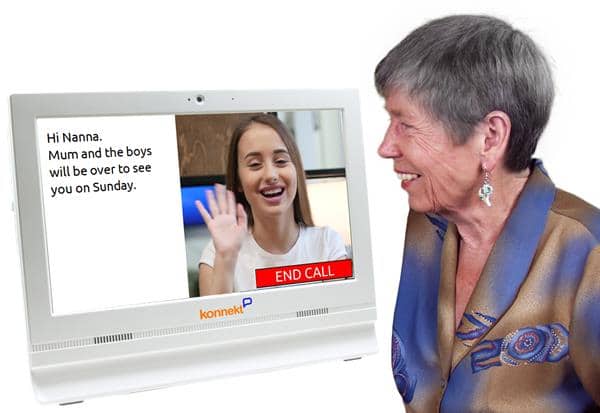
Konnekt Captioning Videophone
- Fast, large, accurate captioning on phone calls and video calls
- Regular phone calls: Call regular phones, too (including landlines)
- When it rings: Screen flashes, and works with Bellman remote alerts
- Funded: Konnekt-Telstra Program, My Aged Care, NDIS and more
Government funding may pay for your Konnekt
If you have deafness, hearing loss or a hearing impairment, or if you are hard-of-hearing or wear hearing aids or a hearing implant, you may qualify. Act now!
Learn about government funding.
Frequently Asked Questions
Yes.
- Free: Video calls are included. Regular phone calls are also included, depending on your funding or plan.
- Internet: We can help, if you have no suitable Internet service. Calls use only a little Internet data.
- App: We help get your family and friends using our free app. They just need a Smartphone or iPad/tablet..
Konnekt Captioning Videophone offers captioning in many languages.
Our video calling app works almost worldwide.
Yes. Konnekt Captioning Videophone can call emergency numbers in most countries, as well as regular phone numbers:
- An optional numeric keypad enables you to call regular phone numbers.
- Speed-dial call buttons are set up to call frequent numbers with one touch.
- Call older friends that have no Smartphone or computer tablet, or don’t want to use video calling.
- Call your service providers, medical professionals, shops, or almost anyone worldwide.
- Speed-dial call buttons can also be set up for one-touch video calls.
Most of our subscriptions and key government funding options include unlimited calls to landline and mobile phone numbers.
Yes. We generally provide a new phone number for your Konnekt phone, unless you tell us that you only want video calling.
People can call you in two ways:
- Give friends and relatives your new Konnekt phone number. They just call your new number from any phone, including landline phones. No app required.
- We can help you call-forward incoming calls to your existing phone number, so that they divert to your Konnekt phone. That way, your friends don’t need to learn your new number. You can still use your existing phone, if you wish, for outbound calls or as a backup phone.
The Konnekt Videophone and our video calling app already provide superb video and sound quality.
Konnekt can help you to further improve video-call quality, or you can read our Video Calling Quality Guide. Here are the key factors.
Reduce noise: Both the caller and receiver need to be located in a room with minimal background noise. This includes turning off TVs and closing windows. If you are outside, try to find a quiet place where there is no wind.
Great Wi-Fi: Ensure that both of you have a very strong Wi-Fi signal, or a strong mobile signal if you are using mobile Internet. This will make the calls clearer both visually and audibly.
Headset or earphones: If you want the absolute best sound quality: Invest in a quality headset or earbuds. We can help.
We can also help you configure Videophone to stream sound direct to hearing aids.
Volume: If you have total deafness, reduce the volume to zero or mute your speaker. Otherwise, set volume to a comfortable level; not too loud.
Clear speech: Ask your friend to speak slowly, clearly and distinctly. If they speak with a strong accent, suggest that they leave gaps between words. Don’t be afraid to ask them to repeat or paraphrase a sentence.
Automatic speech: If you have trouble being understood, a typing-to-voice communicator, also known as a talking keyboard, may be beneficial. If you already have a device that you’re used to typing on, get an AAC app for your PC / tablet / mobile phone. A conventional typing-to-voice communication device can be very expensive but may be easier to use than a free app on a tablet or mobile. The TextSpeak costs about US $500 – $600 and is available here.
Reliable Internet is vital. If you are having difficulties with your internet, Konnekt can recommend or help you with a low-cost, high-reliability provider in many countries. Within Australia, Konnekt can set up and manage a mobile data service for you.

Headsets for captioned calls
Use a good-quality headset, or at least the earbuds that came with your device, which should have a tiny microphone built-in to the cable at around chin level. This will:
- attenuate external noise
- increase sound quality
- reduce echo-suppression artefacts
- improve captioning accuracy